Hot-Label Live Controls
Run your show hands-free
Launch auctions, fire giveaways, and jump to your links with a single keypress — without touching the mouse. Live Controls is $6/mo (or $60/yr) and needs no labels subscription. Add it to any Hot-Label plan, or run it on its own.
What you need to run it
Live Controls is three pieces working together. Get the first two and you're live; the third is your choice of hardware.
1. The extension
The Live Controls Chrome extension is the engine — it listens for your keypresses and drives the stream. It's a separate extension from the Hot-Label printing extension.
Install from the Chrome Web Store →2. A subscription
Either the standalone Live Controls plan ($6/mo, no printing) or an existing Hot-Label Pro or Enterprise plan — Live Controls is included with both.
See all plans →3. A device
The pre-flashed Hot-Label keypad, or any keyboard, macro pad, or Stream Deck you already own. Not required — you can run everything from keyboard shortcuts.
Use your own device →What you get
One-press auctions
Launch your next auction — or a sudden-death round — from your keypad or keyboard, mid-stream.
Instant giveaways
Start a giveaway the moment the room heats up. No menus, no hunting for buttons.
Quick Link
Jump to your storefront, rules page, or any URL you choose, then bounce right back to your stream.
Two ways to run it
The Hot-Label keypad
A dedicated 6-key macro pad with a volume knob, pre-flashed for Live Controls. Plug it in and go — auctions, giveaways, and your Quick Link on physical keys.
Bring your own device
Already have a keyboard, macro pad, or Stream Deck? Map its keys to the Live Controls shortcuts and drive your whole show from hardware you own.
Your keypad, mapped for Live Controls
As a Live-Controls-only seller you don't print labels — so your keypad ships with the Live Controls board, tuned for auctions and giveaways instead of reprinting. Label-printing subscribers get the printing board instead. Same keypad, either way.
Printing board
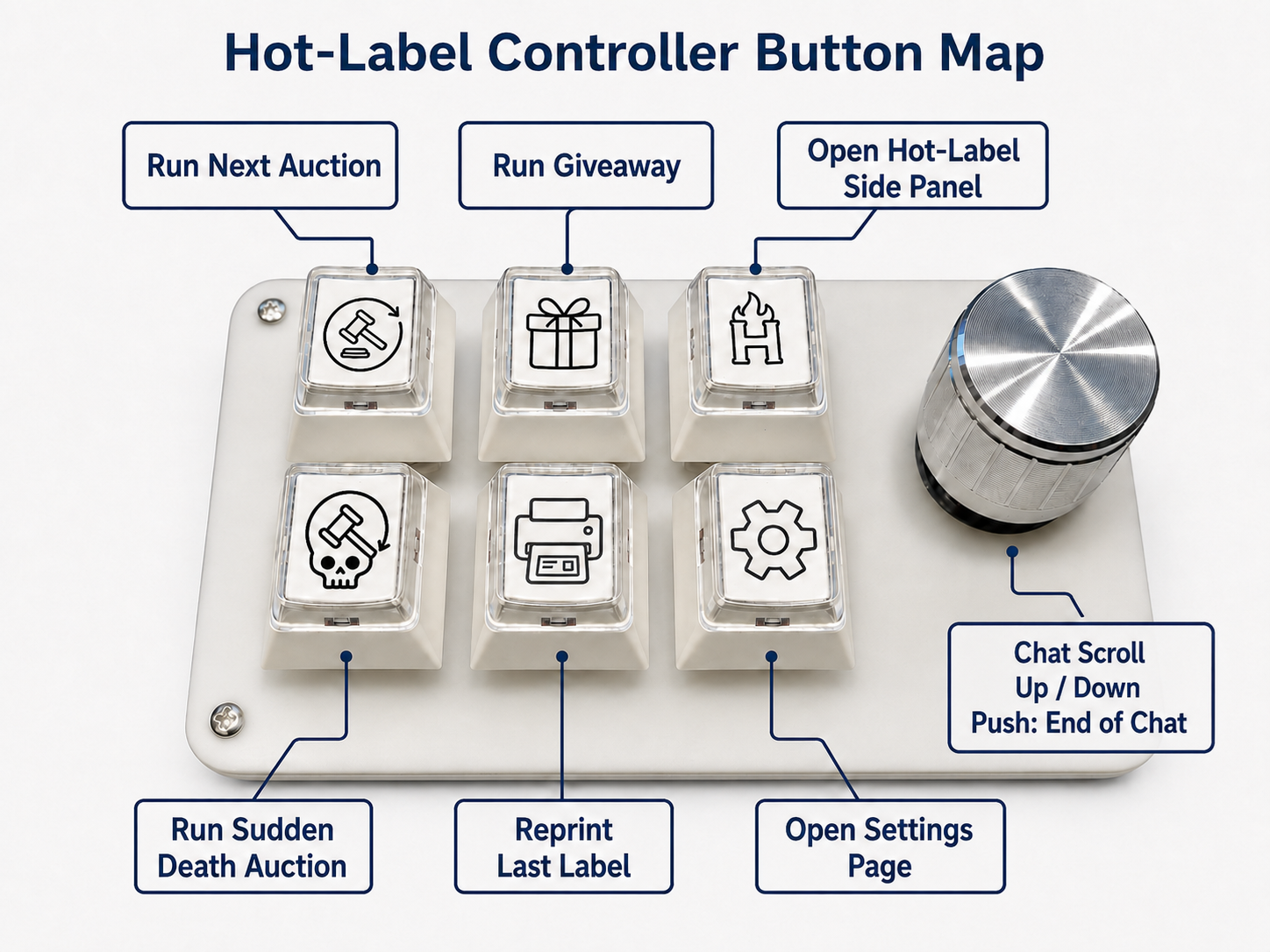
You print labels
Ships to accounts on a labels plan (Starter, Pro, or Enterprise) or with label packs.
Live Controls board
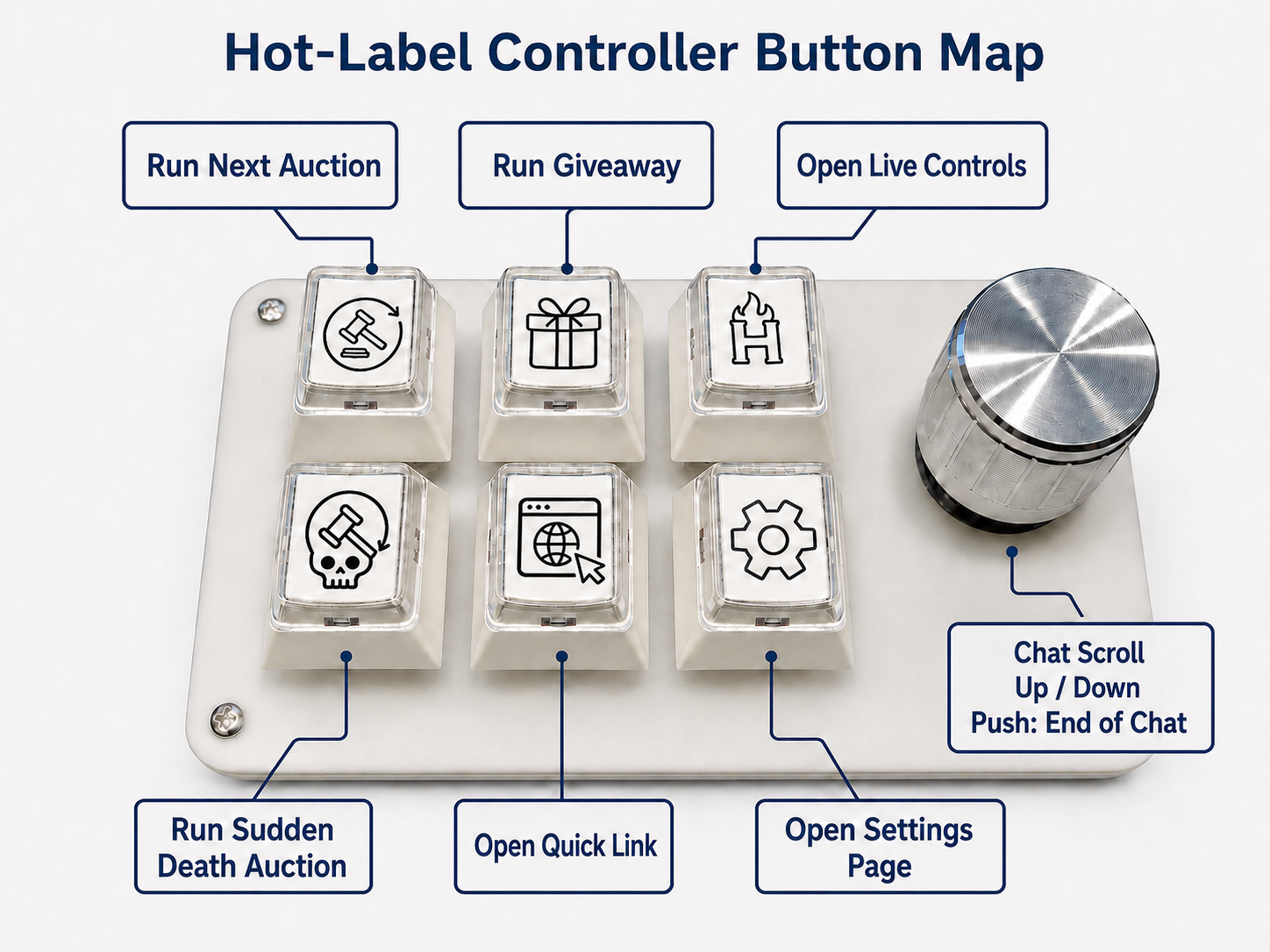
Live Controls only — no printing
Ships to Live-Controls-only accounts — with no label printing, the layout is tuned for Live Controls.
Same keypad, two pre-flashed layouts — which one you get is set automatically by whether your account prints labels. A subscription (a labels plan or Live Controls) is required to order.
Common questions
Do I need the keypad?
No. Live Controls runs entirely on keyboard shortcuts. The Hot-Label keypad — or any macro pad you own — just gives you dedicated physical keys instead of key combos.
Do I need a labels or printing subscription?
No. The standalone Live Controls plan is $6/mo with no printing. It's also included at no extra cost if you're already on Hot-Label Pro or Enterprise.
I already have the Hot-Label extension — is this the same one?
No. Live Controls is a separate Chrome extension from the Hot-Label printing extension. Install the Live Controls extension above; if you print labels too, you'll have both installed.
What do I need to get started?
Three things: the Live Controls extension, a subscription (Live Controls, Pro, or Enterprise), and a device to press the keys — the Hot-Label keypad or a keyboard/macro pad you already own.
Live auction & giveaway controls, hotkeys, and hardware support — no printing subscription required. Already on a labels plan? See all plans →